Enter both lineups before a game
Set your batting order, positions and DP/Flex or DH, and enter the other team by jersey number, before the first pitch.
Before the first pitch, the scorer enters two lineups: your team's, from your roster, and the other team's, by jersey number. This is for the adult scoring for your team: a coach or a scorekeeper signed in to Scoring Pro.
Open the game's lineups
- In Find a game, under Today, choose your game. If a team is asking to join it, answer that first.
- The Lineups screen has two cards, headed Our lineup · not yet or Our lineup · saved, and Their lineup · not yet or Their lineup · saved.
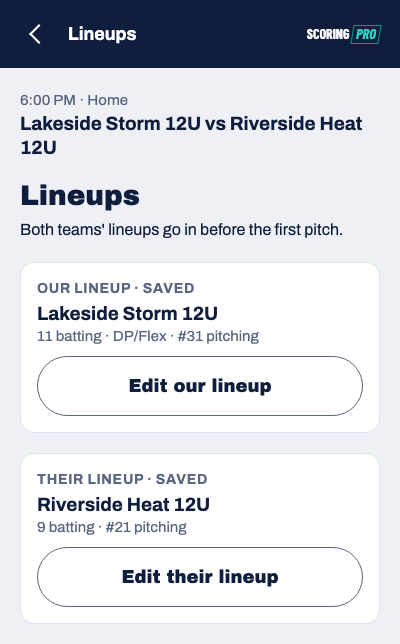
Both lineups have to be saved before Start the game at the bottom of Lineups turns on. When both cards read saved, choose Start the game.
Enter your lineup
- Choose Add our lineup.
- If your team has a lineup from an earlier game, choose Copy from the last game. Otherwise choose Start from the roster, which lists everyone in jersey order. Either way you check the order next.
- On Batting order, put the batters in order. Drag a batter by the ⠿ handle, or choose ⋯ and pick a spot in Move to which spot?. Move to the bench takes a batter out of the order, and Add to order puts a bench player back in.
- Choose a batter to set their position. Positions are optional: Leave it blank is fine. Picking a position another player already has moves it to the batter you chose. If that batter had a position, the two swap; if not, the other player is left with no position.
- Choose Save our lineup.
A copied lineup keeps the batting order, the positions and the DP/Flex or DH. Anyone who has left the roster since that game is dropped. Copying needs a signal; with none, start from the roster.
DP/Flex and the DH
Which one you see depends on the game's rules.
- DP/Flex (softball, the designated player and the flexible player): choose the batter who will be the DP, choose DP, then choose the Flex. The Flex plays defense and doesn't bat, and shows under the order in a dashed row. Choose that row to give the Flex a position. To undo it, choose DP/Flex on at the top of Batting order, then Turn DP/Flex off.
- DH (baseball, the designated hitter): the player the DH bats for has to be on the bench first, so choose ⋯ next to that player and Move to the bench. Then choose the batter who will be the DH, choose DH, and choose the player the DH bats for. If the DH also plays the field, choose No one: the DH also plays the field. To undo it, choose DH on at the top of Batting order, then Turn the DH off.
Enter their lineup
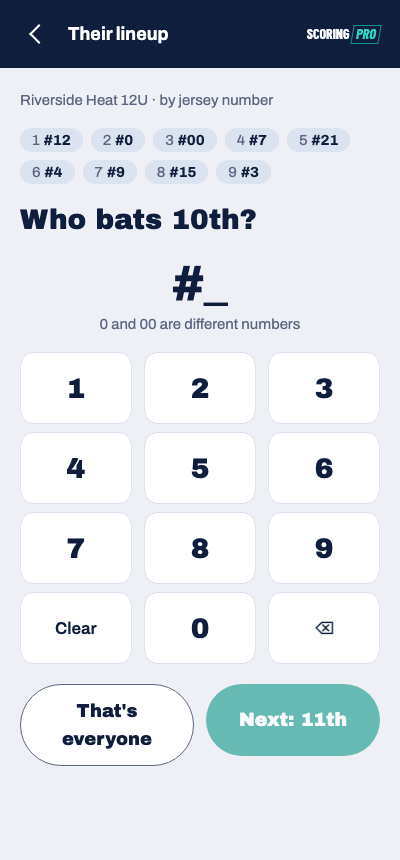
The other team is entered by jersey number only. Their names are never entered.
- Choose Add their lineup.
- For each batter, type their number on the keypad and choose Next (it reads "Next: 2nd", "Next: 3rd" and so on). 0 and 00 are different numbers.
- After the last batter, choose That's everyone.
- Under Who's pitching?, choose their pitcher. If the pitcher doesn't bat, choose Someone who doesn't bat, type their number, then choose Use this number.
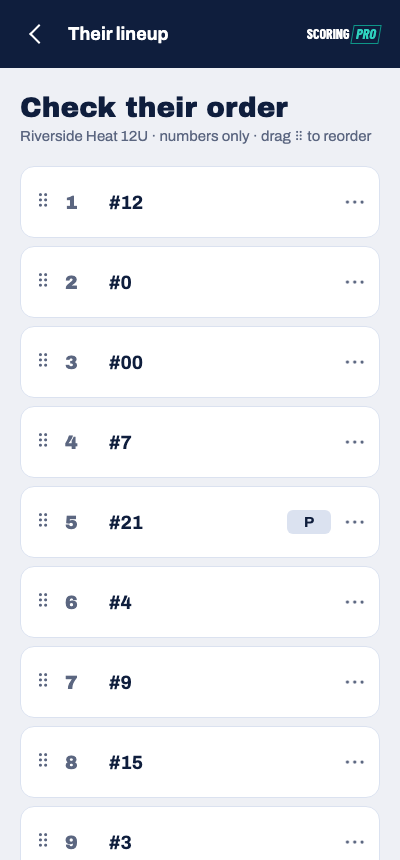
- On Check their order, fix anything that's wrong: drag or ⋯ to move a batter, or Add a batter. Then choose Save their lineup.
Fix a lineup after saving
Choose Edit our lineup or Edit their lineup, make the change, and save again.
Before the game starts, a save is kept on your phone and sent when you're back online. Once plays are scored, a change is checked against them: Scoring Pro turns it down if it would break a play already in the book. With no signal and the game not open on the pad (after the app restarts, say), it can't check, and says "This phone can't check the change against the plays scored so far. With signal, start the game, then change the lineup." Opening a game's lineups for the first time needs a signal.